Software I use: DaVinci Resolve
DaVinci Resolve
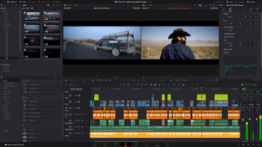
This year I first used it for post-processing the videos for the German Perl Workshop. Usually
the videos only need some slight cutting or insertion of a simple overlay, which ffmpeg does well enough. This year,
I wanted to blank out some PII from a video, and having an interactive
non-linear editor was convenient here.
The program supports Linux, and it is a monster of an non-linear video editor. The free (as in beer) version can do everything I need, the paid version is cheap(ish) at € 300 (?) for a permanent license. The permanent license has more filters and some AI built-in, but I don't need that. Blackmagic Design make their money from selling hardware, and I also have one ATEM Mini Pro HDMI multiplexer.
The software is complex, but there are lots of Youtube videos showing how to find the relevant buttons. It took me half a day to find out how to overlay a video with black bars censoring some personal identifying information (PII) for our workshop videos. But in the process I also learned that even the free edition of Resolve can do automatic tracking of elements in a shaky-cam video.
For creating the filters, Resolve has the usual filter graph infinite canvas, which also takes some getting used to. But the automatic layout of the graph connections works well enough for me, and I'm not doing anything fancy like camera tracking or inserting dynamic video into other video.
I've used the software on my beefy Windows machine with an RTX 4090 and 128GB RAM, and editing and rendering a video on that machine is a breeze, even on a remote desktop connection from my main Linux desktop. On Debian, I didn't get it to run since it wants a newer version of the Nvidia drivers than Debian stable provides, and I didn't want to play around with mixing Debian stable and the Nvidia repositories.