Create calendar entries from images
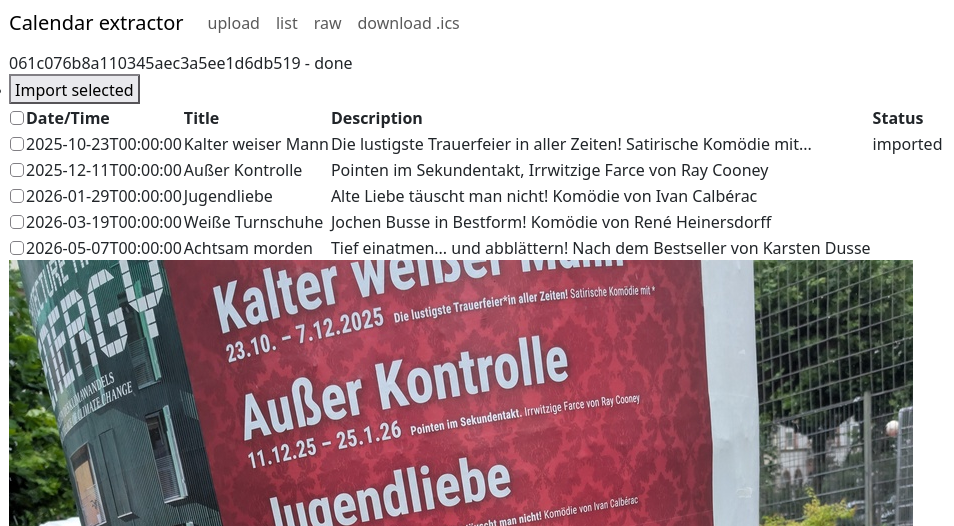
Recently I was at a conference that only published their agenda as a .pdf
file. While I had ample time to manually transcribe the agenda into my
calendar, I wanted a more automated approach, maybe using one of these
newfangled LLM things that are said to be able to extract text from images
based on a simple prompt. Extracting event information from the agenda
would likely also expand well to pictures snapped of concert posters with
my phone camera, just to get a placeholder in my calendar.
If you subscribe to one of the large phone ecosystems, a lot of this functionality already exists.
Google Lens can extract the event dates from pictures for example. But I
don't share my calendar with neither Google nor Apple, so I want a more custom
and more streamlined application.
Since toying around with Net::CalDAV::FindEntry,
I feel familiar enough with CalDAV and Net::CalDAVTalk
to see the import as no problem. The resulting application should be
a two-page basic web application that is reachable via my private network.
Extracting the information is easy by using GLM-4.6V. This means of course sharing
that information with some outside party, but it is only potential events and not my whole
calendar that I'm sharing.
The code also lives on Github,
at least until I move back from Github to self-hosted git repositories.
Application structure
As usual, I wrote the app in Perl, using Mojolicious and I also sprinkled
some HTMX 4 on it, for some interactivity. For example, the image upload
form does not need a second click to actually upload the selected image.
Also, while processing the image with the LLM, the page automatically
refreshes until the results are in.
The steps (and pages) of the app
Upload
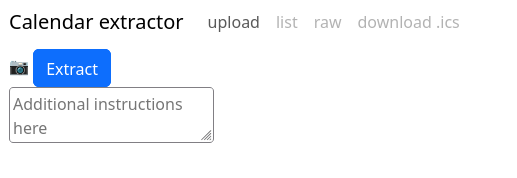
Uploading consists of an image and also an optional prompt, to maybe reduce
the number of events created. I found that some nudging for events in the past
or in the future was needed. Uploading the image happens together with
pressing the camera icon. This is not great if you selected the wrong image,
but that happens rarely to me and adding another image isn't that bad.
Processing
I was too lazy to capture the reloading while the extraction is processing.
Results
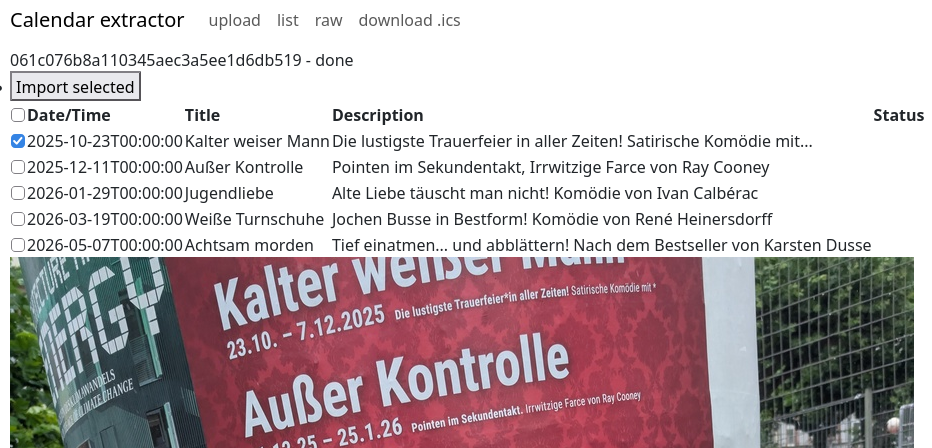
The results page allows to select events for import and also shows the preview
with title and description. The text recognition isn't always great, but
it is Good Enough for my needs.
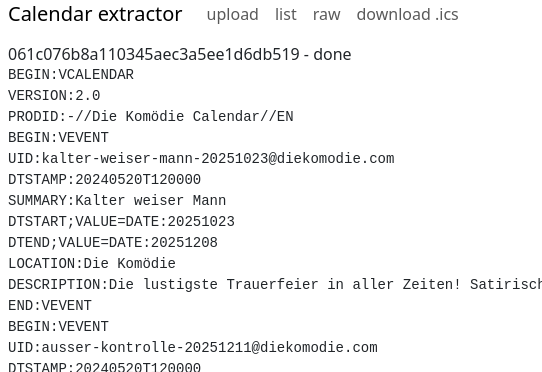
At least for debugging, I also wanted a quick way to inspect the generated
.ics calendar data, so I added the "raw" view. This displays the raw
data in all its g(l)ory.
Imported event
After importing, the app also checks my calendar whether the event has already
been imported. This is highly convenient for me to see whether everything
actually worked.
Developing with GLM-5.3
I used GLM-5.3 for parts of the development. I had the model write most of the
test suite and also had it review the HTML and the use of HTMX. It found some
things that would have been annoying for me to find, like double id
attributes on HTML elements, old HTMX attributes that HTMX 4 does not support
anymore.
The fixes the model proposed were also of acceptable quality, but I did not
let it create new features alone. Everything was tightly guided, which results
in code quality that I am content with.
Why?
Recently I took up
photography
again. Or rather, I made more of a conscious effort to take pictures again, as
opposed to snapping them. I have
my existing image import pipeline,
which copies the files from the devices to my central server into timestamped
directories.
Recently I actually exhausted the storage of my mobile phone and that made me
realize that I want to run my photo import via rsync from abroad on my phone
instead of local-only copying via mounted drives.
Reading files
Before the change, the program took all files in the DCIM directory and
copied them via an SMB mount to the central server:
- Find all files in
DCIM/Camera directories
- Read the image creation times from image EXIF data
- Upload all files into directories grouped by their timestamps
- Move all files into the
DCIM/Camera/archive as a safety measure. I manually delete the archive/ directory from time to time
But running the import on a gphoto2 mounted directory does not allow to move transferred files to the DCIM/archive directory.
This would be ameliorated by using rsync. but a more discerning approach is still needed since I might have renamed the target directories
on the central server in the meantime.
The new approach addresses these points
- Find all files in
DCIM/Camera directories
- Find (rough) creation date from image filename (fast), or from image EXIF data (slow, needed for sequentially numbered image file names)
- Read the remote directories starting from the earliest image timestamp
- Associate each image with a target directory
- if it already exists on the remote side, use that directory
- use the image timestamp for the image otherwise
- Upload all files into their target directories using
rsync
Using rsync and always transferring / synchronizing all images makes the transfer resilient against network failures and partial transfers.
Looking at the already existing filenames on the target end also opens the door to reading calendar entries and creating the directories with their calendar entry outright, as I've decoupled the directory name from the image creation timestamp.
Having an ssh remote target
Moving to rsync also enables backing up to a remote machine over ssh. To move the files into the appropriate locations, I also need to read remote directories.
I did not find an established module on CPAN for this. Filesys::Virtual::SSH is OKish, but I don't like the API
of Filesys::Virtual overall. I only needed a single routine to read a remote directory, so I wrote a very simple wrapper:
sub r_readdir($dir, $type="d") {
    if( $dir =~ m!^ssh:(?<host>(\w+\@)?[^:]+):(?<path>.*)! ) {
        my $p = $-{path}->[0];

        my $cmd = "ssh '$-{host}->[0]' 'find \"$p\" -type $type'";

        currently("Reading '$p'");
        if($verbose) {
            $printer->output_permanent($cmd);
        }

        return map { s!^\Q$p\E[/\\]?!!r }
            split /\r?\n/,readpipe( $cmd );
    } else {
        opendir my $dh, $dir
            or die "Can't read '$dir': $!";
        return readdir($dh);
    }
}
This allows me to keep all filtering local in perl, which is not efficient over the
network but highly efficient in protecting me from needing to shell-escape all the commands.
Naming the image import directories
I often end up with directories named 20260417-1603 , which is better than
nothing. But I still would like to know what happened then. Often I have an
entry in my calendar which might be so-and-sos birthday party, or some
conference or whatnot, and having the computer automatically naming the
directory according to the calendar is a nice touch. I've put off this for a
long time, but now I've actually released
Net::CalDAV::FindEntry
to make this convenient:
my @relevant_events = $cal->get_events(
    after    => $image_timestamp,
    before   => $image_timestamp,
    calendar => 'Corion'
);

# We blindly take the event that started closest before the photo was taken
my ($ev) = sort { $a->{start} cmp $b->{start} } @relevant_events;
if( $ev ) {
  $target_directory{ $image } //= "$image_timestamp - $ev->{title}";
}
With that line added, I get conveniently pre-named directory names on the
central server. It's still not perfect, as the directory naming needs to
respect timezones
while the image timestamps are either in a floating timezone or GMT,
but this gets me a long step forward in convenience. Also, I need to clean
up the titles of the calendar entries to make them suitable as directory names.
Originally I thought
Text::CleanFragment
would be good for this, but it replaces spaces with underscores, which I do
not want in the directory names, so I wrote a small ad-hoc sanitizer
for that. So there still is work to do in the future.

One of my yearly things is to post-process and publish the videos
we (well, Lee Johnson) record of the German Perl Workshop.
The videos get recorded in OBS Studio and already get the
sidebar with the sponsor information, talk and speaker information. After the workshop has
concluded, these files then need to be post-processed.
Most of it is automated with a large Makefile. This covers
- Importing the talk metadata from Act
- Setting up a cutting pipeline to trim the talks
- Adding the metadata of speaker and talk title to each video
- Adding a header and a trailer to each talk
My main tasks there are to create an SVG image to use as a titlecard, and to wrestle with ffmpeg
so it uses hardware acceleration instead of only CPU processing.
After producing the final videos, each talk gets reviewed for obvious bad stuff, like audio cutting out
or otherwise too bad quality.
The last step then is to upload the videos to Youtube, create a new playlist there and retitle
all the uploaded videos with the event, speaker and title. This is mostly a manual task, since automating
Youtube would mean to have to deal with another always-shifting API.
After all these manual steps, I'm still happy to present the GPW2026 videos
to you.
This post is part of the notes I took while preparing for and during the migration of https://perlmonks.org behind a CDN. I mostly publish these notes so that I can find them again later.
There are situations where I don't want to override the DNS resolution for my complete system, but still connect to specific machines pretending a DNS name resolves to them. Examples are SSL certificate checking, and various firewall configurations. Especially while migrating a site behind a CDN or when setting up s site beh[nd a reverse proxy or Wireguard, I want to inspect and compare the results of queries to the different machines.
For these examples, assume that 10.0.0.1 is the machine serving the website
perlmonks.org as the origin. The public DNS resolves to a pool of CDN machines
somewhere else, but we want to debug what the original source is serving.
The original machine also wants to be accessed as perlmonks.org over SSL.
Override curl name resolution
This is documented in the curl manpage
curl --resolve perlmonks.org:443:10.0.0.1 https://...
Override Firefox name resolution
Open the Firefox browser console with Ctrl+Shift+J . You should be able to enter Javascript there; If not, enable "Debugging Tools für Browser-Chrome" in the normal browser console settings (F12 , then F1 yeah, CUI standards be damned ). Then enter the name/IP pair for name resolution. This persists until you restart Firefox.
const gOverride = Cc["@mozilla.org/network/native-dns-override;1"].getService(Ci.nsINativeDNSResolverOverride);
gOverride.addIPOverride("perlmonks.org", "10.0.0.1");
Override LWP::UserAgent DNS name resolution
For LWP::UserAgent there is no general mechanism, but monkeypatching LWP::Protocol::https works. To also make SNI work, you
should additionally pass in the SSL_hostname explicitly to the SSL options. I'm not sure why this is necessary, as the code in LWP::Protocol::https
extracts the hostname from the request URL, but this made the difference for me between 421 Misdirected Request and 200 OK with Fastly :
our $force_peeraddr;
around 'LWP::Protocol::http::_extra_sock_opts' => sub {
        my $orig = shift;
        die unless wantarray;
        my @rv = $orig->(@_);
        push @rv, PeerAddr => $force_peeraddr if defined $force_peeraddr;
        return @rv;
};
around 'LWP::Protocol::https::_get_sock_info' => sub {
        my $orig = shift;
        my ($self, $res, $sock) = @_;
        my $cert = $sock->get_peer_certificate;
        my @san = $cert->peer_certificate('subjectAltNames');
        use Data::Dumper; warn Dumper \@san;
        while (@san) {
                my ($type_id, $value) = splice @san, 0, 2;
                $res->push_header("Client-SSL-Cert-SubjectAltName"
                        => "$type_id: $value");
        }
        $orig->(@_);
};

$force_peeraddr = '10.0.0.1';

my $ua = LWP::UserAgent->new(
    ssl_opts => {
        verify_hostname => 0,
        SSL_hostname => 'perlmonks.org', # for SNI
    },
    timeout => 60,
);
Override Chrome name resolution
It seems that this is not possible.
Override wget name resolution
It seems that this is not possible.
I really like live-editing documents. Interactively seeing the results of your edits makes editing more fun. For tools made by others, this would mean WYSIWYG, but for tools made by (and for) myself, I prefer the approach
of editing a text file and having the conversion process kick off automatically on every file save.
For some reason, I mostly prefer editing text in a plain/small editor as ASCII. My markup needs are usually restricted to bold and italics, with a sprinkling of images and links. I don't have particular layout needs - most of that is covered by a template.
The main idea is to have two programs, one program for editing (commonly, a text editor) and one program for converting and displaying the rendered file. Instead of having a program that does the display and editing for
one or more file formats, this separation allows me to use the convenient text editor that I've customized to my liking instead of a built-in text editor. It also
allows me to add arbitrary intermediate steps to convert from the source to the display.
This idea is nothing new - the Emacs Flymake mode
does recompilation (and other recreation) in the background whenever a source file changes as well.
With File::ChangeNotify ( and Linux::Inotify2 on Linux, respectively File::ChangeNotify::ReadDirectoryChanges for Windows, writing such tools that auto-update the viewer whenever the source file changes is really easy.
One of the programs that implement this idea is live-edit.pl.
This program runs make whenever a file in a given directory or its subdirectories changes. The Makefile
should contain the rules to regenerate the interesting content. The default rules
are only for converting LaTeX files into PDF:
# This is the default Makefile to be used by the asset reloader
# if no Makefile is found in the current directory

OPEN=xdg-open
MAYBE_OPEN=perl /home/corion/Projekte/App-LiveEdit/scripts/maybe-open.pl

.PHONY: all

all: .pdf

.pdf.tex:
    pdflatex -interaction=batchmode "$<"
    $(MAYBE_OPEN) "$@"
make solves the problem backwards, given a file that I want, regenerate everything
intermediate. live-edit.pl solves the problem forwards, given a file that changed, regenerate everything that depends on it.
Maybe live-edit.pl should be named ekam instead.
maybe-open.pl - this is an offshoot program that opens a file using xdg-open
if no process
is running with the file name on its command line. Highly convenient for launching
a .pdf file once in its viewer.