This post is part of the notes I took while preparing for and during the migration of https://perlmonks.org behind a CDN. I mostly publish these notes so that I can find them again later.
There are situations where I don't want to override the DNS resolution for my complete system, but still connect to specific machines pretending a DNS name resolves to them. Examples are SSL certificate checking, and various firewall configurations. Especially while migrating a site behind a CDN or when setting up s site beh[nd a reverse proxy or Wireguard, I want to inspect and compare the results of queries to the different machines.
For these examples, assume that 10.0.0.1 is the machine serving the website
perlmonks.org as the origin. The public DNS resolves to a pool of CDN machines
somewhere else, but we want to debug what the original source is serving.
The original machine also wants to be accessed as perlmonks.org over SSL.
Override curl name resolution
This is documented in the curl manpage
curl --resolve perlmonks.org:443:10.0.0.1 https://...
Override Firefox name resolution
Open the Firefox browser console with Ctrl+Shift+J . You should be able to enter Javascript there; If not, enable "Debugging Tools für Browser-Chrome" in the normal browser console settings (F12 , then F1 yeah, CUI standards be damned ). Then enter the name/IP pair for name resolution. This persists until you restart Firefox.
const gOverride = Cc["@mozilla.org/network/native-dns-override;1"].getService(Ci.nsINativeDNSResolverOverride);
gOverride.addIPOverride("perlmonks.org", "10.0.0.1");
Override LWP::UserAgent DNS name resolution
For LWP::UserAgent there is no general mechanism, but monkeypatching LWP::Protocol::https works. To also make SNI work, you
should additionally pass in the SSL_hostname explicitly to the SSL options. I'm not sure why this is necessary, as the code in LWP::Protocol::https
extracts the hostname from the request URL, but this made the difference for me between 421 Misdirected Request and 200 OK with Fastly :
our $force_peeraddr;
around 'LWP::Protocol::http::_extra_sock_opts' => sub {
        my $orig = shift;
        die unless wantarray;
        my @rv = $orig->(@_);
        push @rv, PeerAddr => $force_peeraddr if defined $force_peeraddr;
        return @rv;
};
around 'LWP::Protocol::https::_get_sock_info' => sub {
        my $orig = shift;
        my ($self, $res, $sock) = @_;
        my $cert = $sock->get_peer_certificate;
        my @san = $cert->peer_certificate('subjectAltNames');
        use Data::Dumper; warn Dumper \@san;
        while (@san) {
                my ($type_id, $value) = splice @san, 0, 2;
                $res->push_header("Client-SSL-Cert-SubjectAltName"
                        => "$type_id: $value");
        }
        $orig->(@_);
};

$force_peeraddr = '10.0.0.1';

my $ua = LWP::UserAgent->new(
    ssl_opts => {
        verify_hostname => 0,
        SSL_hostname => 'perlmonks.org', # for SNI
    },
    timeout => 60,
);
Override Chrome name resolution
It seems that this is not possible.
Override wget name resolution
It seems that this is not possible.
I really like live-editing documents. Interactively seeing the results of your edits makes editing more fun. For tools made by others, this would mean WYSIWYG, but for tools made by (and for) myself, I prefer the approach
of editing a text file and having the conversion process kick off automatically on every file save.
For some reason, I mostly prefer editing text in a plain/small editor as ASCII. My markup needs are usually restricted to bold and italics, with a sprinkling of images and links. I don't have particular layout needs - most of that is covered by a template.
The main idea is to have two programs, one program for editing (commonly, a text editor) and one program for converting and displaying the rendered file. Instead of having a program that does the display and editing for
one or more file formats, this separation allows me to use the convenient text editor that I've customized to my liking instead of a built-in text editor. It also
allows me to add arbitrary intermediate steps to convert from the source to the display.
This idea is nothing new - the Emacs Flymake mode
does recompilation (and other recreation) in the background whenever a source file changes as well.
With File::ChangeNotify ( and Linux::Inotify2 on Linux, respectively File::ChangeNotify::ReadDirectoryChanges for Windows, writing such tools that auto-update the viewer whenever the source file changes is really easy.
One of the programs that implement this idea is live-edit.pl.
This program runs make whenever a file in a given directory or its subdirectories changes. The Makefile
should contain the rules to regenerate the interesting content. The default rules
are only for converting LaTeX files into PDF:
# This is the default Makefile to be used by the asset reloader
# if no Makefile is found in the current directory

OPEN=xdg-open
MAYBE_OPEN=perl /home/corion/Projekte/App-LiveEdit/scripts/maybe-open.pl

.PHONY: all

all: .pdf

.pdf.tex:
    pdflatex -interaction=batchmode "$<"
    $(MAYBE_OPEN) "$@"
make solves the problem backwards, given a file that I want, regenerate everything
intermediate. live-edit.pl solves the problem forwards, given a file that changed, regenerate everything that depends on it.
Maybe live-edit.pl should be named ekam instead.
maybe-open.pl - this is an offshoot program that opens a file using xdg-open
if no process
is running with the file name on its command line. Highly convenient for launching
a .pdf file once in its viewer.
Lethal Trifecta
All AI agents must live in the Lethal Trifecta as coined
by Simon Willison.
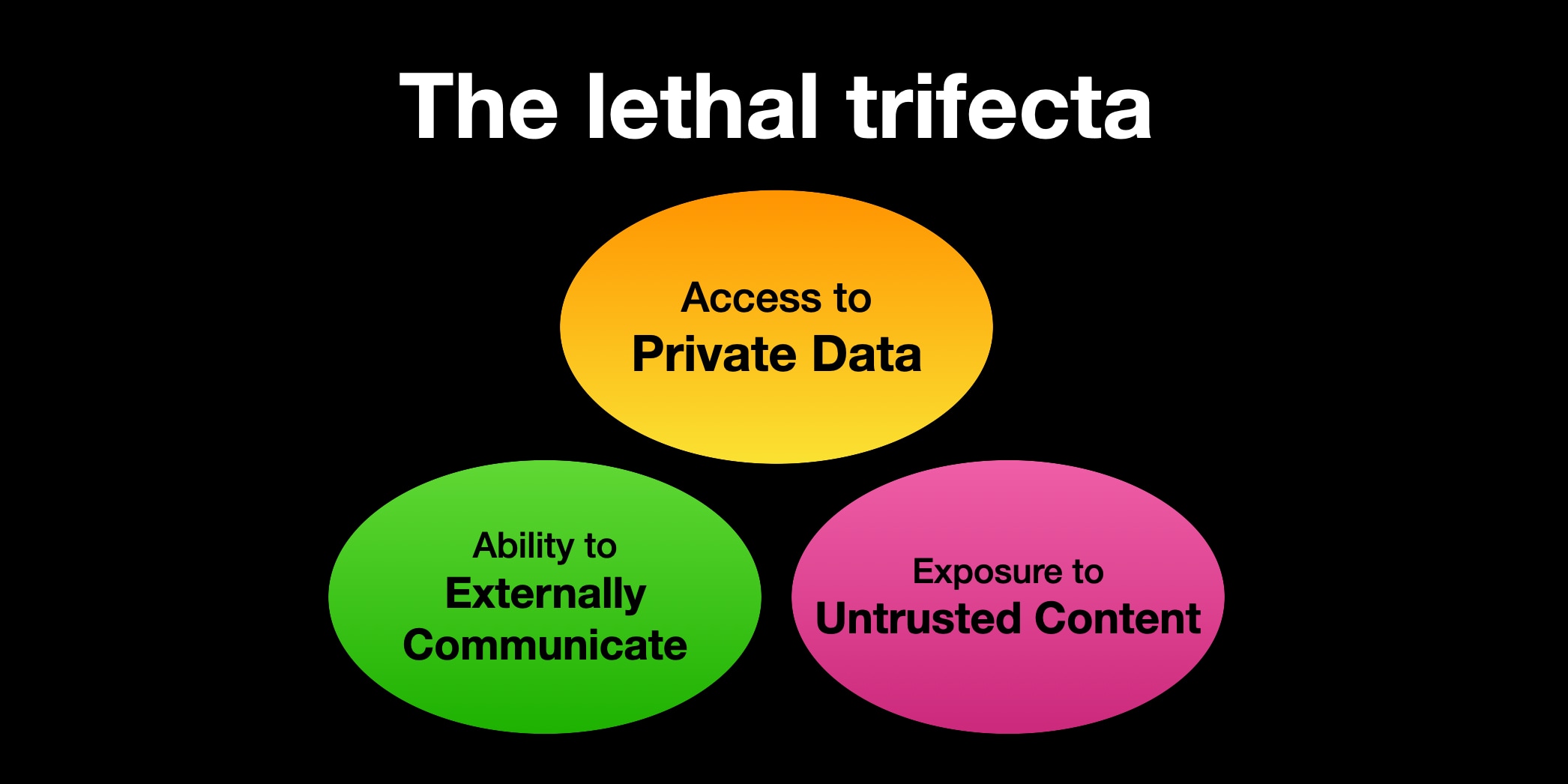
For programming assistants, who need to be online to install modules and to run tests
this basically means they cannot have access to private information. So my solution is to run them
in a podman container where they have read/write access to a directory where I also check out
the code the agent should work on.
This is somewhat in contrast to the current meme of letting an
OpenClaw assistant run with your credentials, your
email address and input from the outside world.
Setup
My setup choses to remove all access to private data, since for programming
an agent does not need access to any data that should not be publically known.
- Claude Code within its own Docker container
- Runs as
root there
- Mount
/home/corion/claude-in-docker/.claude as /root/.claude
- Mount working directory as
/claude
- (maybe) mount other needed directories as read-only, but I haven't felt the need for that
Dockerfile
FROM docker.io/library/debian:trixie-slim
# debian-trixie-slim
RUN <<EOF
apt update

# Install our packages
DEBIAN_FRONTEND=noninteractive TZ=Etc/UTC apt-get install -y npm perl build-essential imagemagick git apache2 wireguard wget curl cpanminus liblocal-lib-perl ripgrep

# Install claude
curl -fsSL https://claude.ai/install.sh | bash

# Set up our directories to be mountable from the outside
mkdir -p /work
mkdir -p /root/.claude

# Now you need to /login with claude :-/

# claude plugins install superpowers@superpowers-marketplace

EOF

# Add claude to the search path
ENV PATH="/usr/local/sbin:/usr/local/bin:/usr/sbin:/usr/bin:/sbin:/bin:/root/.local/bin"
ENTRYPOINT ["bash"]
CMD ["-i"]
Script to launch CC
Of course, the first thing an AI agent is used for is to write a script
that launches the AI agent in a container. This script is
very much still under development as I find more and more use cases that
the script does not cover.
Development notes
While developing the script, I found that Claude Code very much needs
example sections to work from. On its own, it comes up with code that is not
really suitable. This mildly reinforces to me that the average Perl code
used for training is not really good.
Last Monday I did the Perl Developer Release of Perl 5.43.7. As usual, I worked from the Release Managers Guide . Everything worked well, even if everything was cutting it a bit close. My video setup on the desktop was not suited for streaming anymore, so I had to do a stream consisting only of the console window and me talking over it, and no floating head of me available.
What worked well
The Twitch chat was the most active that I witnessed when streaming a Perl release. We chatted about organizing Perl conferences and also the Perl release process. One realization for me was that the RMG process is mostly there to exercise the Perl build machinery and testing that the generated tarball does not have deficiencies. This means that testing that Perl can build through Configure is important, but testing different Perl configurations like ithreads or userelocatableinc is not that important.
The dashboard for tracking my progress through the release worked well up to the release. I had modified it in the weeks leading up to the release to not only show the human step description but also to show the command line steps that should be undertaken, where applicable. I see this as a first step in automating these steps where possible and sensible.
What didn't work out
The dashboard can use some improvements:
The script did not cope well with the events after the release when the repo version number was bumped from 5.43.7 to 5.43.8. This part needs to be investigated but is easy to replicate by simply launching the dashboard with a version number before the current version number.
The script could highlight the current position in the sequence better. For console output this would likely mean inverting the line where the next applicable step is, but this means moving the output from Text::Table to a custom table generation or post-patching the string from Text::Table with the appropriate console commands.
The script should generate HTML and terminal output at the same time. Having output visible in a browser feels less retro but makes things like publishing the progress elsewhere easier.
The script should have a feature to simply output the next step. This could be integrated into the shell prompt to give a guided message in the console window. Maybe the console output and the HTML output should be done as files when in "interactive" mode?
Improvements to the Perl Release Process
More parallelism - the current release manager guide uses make test in many places. This runs the test suite in serial mode, which takes on my machine about 10 minutes. Running the test suite in parallel takes about 4-5 minutes. This is implemented using the make test_harness command. Whether Perl should move the default of parallel testing to make testfrom make test_harness is debatable. Most likely everybody who cares about speed already runs the test suite in parallel.
Remove sequences of shell commands - comparing the file names between the previous and current Perl version is done using a sequence of shell commands involving sort, diff`. I have a patch that adds a small tool to do that within Perl (mostly powered by Algorithm::Diff ).
From time to time, I look back and take tally of what programs and modules
I released in the past. This is one of these posts.
This module is a clone of the Mixmark turndown library,
which converts HTML into Markdown.
my $markdown = html2markdown('<h1>Hello World</h1>');
# Hello World
The module is highly convenient for my
note-taking tool, which lets
me edit notes as contentEditable HTML to enable formatting and pasting
of images etc. .
Other times, I want to do quick text editing, and using Markdown is far more
convenient than editing HTML on my mobile phone. As I store the documents not
as HTML but Markdown, converting from HTML/contentEditable to Markdown is
helpful here.
The nice thing about this module is that I chose to reuse the test suite of
the turndown Javascript library and styled the code similarly to the
Javascript example. That made porting some changes in the Javascript library
to Perl very easy, even if I don't strive for 1:1 identity.
Date::Find - extract dates from filenames
Together with the app move-year, this is a nifty tool to watch my download
directory and move bank statement .pdf files into the corresponding
directories organized by year. Often these files are named in weird ways
like statement-03.01.2025.pdf or accountstatement-2025-january.pdf, but I
want them in a directory bankstatements/2025/ . Date::Find looks at the
filenames and finds the year (and month, and day). The app then creates the
appropriate year (or month, or day) directory and moves the file there.
As my note-taking tool fetches link previews, I want to be a bit more cautious
as to what URLs I freely fetch. This adapts
Net::DNS::Paranoid and the
ruleset to also work for Mojolicious.
What I did not release
That link preview/card generation thing - postponed
Mojolicious::Plugin::UrlWithout
A small HTML page helper that returns an URL without a given key/value combination:
    my $url = "/filter?label=foo&label=bar";
    my $other = url_without( "/filter", label => 'foo' );
   # /filter?label=bar
This module sounded like a really good idea, so I wrote it. The use case was a
search/filter page, where you can toggle different labels by clicking on them.
The labels were realized as <a href=... elements. Then I realized I don't
need it at all, if I switch my HTML to a form with GET and use HTMX to
automatically update the filter:
<form method="GET" action="/filter" hx-get="/filter" hx-trigger="change from:input changed">
<label for="label-foo">foo</label><input type="checkbox" checked name="label" value="foo" />
<label for="label-bar">bar</label><input type="checkbox" checked name="label" value="bar" />
<button type="submit" class="nojs">Apply</button>
</form>
Patches I contributed
I contributed a small change to the
DBD::SQLite catalog functions so it
now also knows about generated columns in a table. Funnily, the old SQLite
function was named table_info, and the function including the generated
columns is named table_xinfo . I guess once there is another type of
information to return, they will need to add table_yinfo, or move to the
Microsoft-stlyle of having table_info_ex(), with another parameter listing
the information actually wanted by the caller.
Patches that were not applied (yet)
Together with Mojo::UserAgent::Paranoid, I also
added IPv6 support to Net::DNS::Paranoid,
but my changes have not yet been reviewed or accepted.
I use that patched module locally, and there it works well.